
Table of Contents
ToggleIntroduction
You’re already writing blog posts, but they’re probably not getting the traffic you expected. The problem isn’t effort – it’s lack of proper SEO optimisation. For this, you should learn exactly how to create SEO friendly blog post that rank on Google and bring consistent traffic.
In my experience working with SEO content, the difference between a blog that gets zero traffic and one that ranks on Google is not effort – it’s strategy, structure, and optimisation. Google evaluates content based on experience, expertise, authority, and trust (E-E-A-T) to determine what deserves to rank.
In this guide, I’ll show you exactly how to write an SEO-friendly blog post step by step so you can rank on Google, drive consistent traffic, and build long-term authority.
Key Takeaways
- SEO friendly blog post are optimised for both users and search engines to rank higher and drive traffic.
- Keyword research guides your content direction by targeting what users actually search.
- Content structure using headings improves readability and helps Google understand your page.
- E-E-A-T signals (Experience, Expertise, Authority, Trust) directly impact rankings.
- On-page SEO, like titles, meta descriptions, and URLs, improves visibility and CTR.
- Consistency and updates are critical for long-term organic traffic growth.
What Is an SEO Friendly Blog Post in Simple Terms?
An SEO-friendly blog post is content optimized to rank on search engines while providing value to readers.
This means your blog is written based on search intent, keywords, and structure, not random ideas. For example, instead of writing “How I Started Blogging,” an SEO version would target “how to start a blog and make money.”
It focuses on both humans and algorithms. Google wants useful, structured, and trustworthy content.
Difference between a normal vs SEO blog:
Factor | Normal Blog | SEO Blog |
Focus | Personal writing | Search intent |
Keywords | Not optimized | Strategically placed |
Structure | Random | H1, H2, H3 optimized |
Traffic | Low | High potential |
Key insight:
“An SEO-friendly blog post is content optimized to rank on search engines while providing value to readers.”
If you are still confused about what blogging actually is and how it works, I strongly recommend reading this beginner guide on what blogging is and how it makes money. It will clear your basics completely.
Why Are SEO Friendly Blog Post Important for Traffic?
SEO-friendly blog posts are important because they drive consistent organic traffic, increase visibility, and improve monetization potential.
First, 68% of online experiences start with a search engine – Source: Elementor, 2025
That means if you’re not ranking, you’re invisible.
Second, blogs receive 70% of traffic from organic search – Source: Marketing LTB, 2025
For example, a well-optimized post can bring traffic for years without ads.
Third, SEO directly impacts revenue. Companies with blogs generate 67% more leads – Source: SEO.com, 2025
Fourth, AI search is changing the game. Websites optimized for AI can get 320% more traffic – Source: TechRadar, 2026
Key insight:
“On-page SEO includes optimising titles, headings, meta descriptions, and URLs to improve search visibility.”
One thing most blogs miss is consistency – publishing just one SEO blog won’t work, but publishing 20 optimised posts builds real authority.
Read: How to Increase Blog Traffic Fast (Realistic Growth Blueprint for 2026)
How Do You Write an SEO Friendly Blog Post Step-by-Step?
Writing an SEO-friendly blog post is a structured process where each step builds on the previous one to improve rankings, traffic, and user experience.
Step 1: Keyword Research (The Foundation of SEO)
Keyword research is the process of finding what your audience is actually searching for and using those terms in your content.
First, you need to understand one thing clearly:
If nobody searches your topic, your blog will not get traffic.
That’s why keyword research comes first.
According to industry data, keyword research helps identify real user demand and intent – Source: Semrush, 2026
How to do it properly:
Start with a seed keyword (basic topic)
- Example: blogging
Expand it using:
- Google autocompletes
- “People Also Ask”
- Related searches
Find long-tail keywords
- Example: how to write SEO friendly blog post for beginners
What to look for:
- Search volume (demand)
- Competition (difficulty)
- Intent (very important)
Weak execution:
Don’t choose random broad topics like “My blogging journey”
Strong execution:
Always try to target long tail keywords like “how to start a blog and make money step by step”
Key insight:
Keyword research is not guessing – it’s data-driven content planning.
In my experience, most beginners skip keyword research, which is why their blogs fail to get traffic.
Read: How to Do Keyword Research Using AI (Ultimate Guide to Find Low Competition Keywords Fast in 2026)
Step 2: Understand Search Intent (Most Bloggers Fail Here)
Search intent is the reason behind a user’s search query.
This is where most beginners lose rankings.
Even if your content is good, if it doesn’t match intent, it will not rank.
According to SEO research, Google prioritises content that matches user intent over keyword density.
Types of search intent:
Intent Type | Example Keyword | What User Wants |
Informational | how to write blog | Learn |
Navigational | WordPress login | Find site |
Transactional | buy hosting | Purchase |
How to match intent:
- Search your keyword on Google
- Analyse the top 5 results
- Copy their format (Not content)
Example:
Keyword: Seo friendly blog post
Top results:
- Guides
- Step-by-step tutorials
So, you must also create a step-by-step guide
Key insight:
SEO is not about writing better – it’s about writing what Google already rewards, but better.
I’ve seen many blogs fail because they write good content but ignore search intent completely.
Step 3: Create a High-CTR Title (Traffic Trigger)
Your title determines whether people click or ignore your blog.
Even if you rank #1, a weak title = low traffic.
What makes a high CTR title:
- Contains keyword
- Has a benefit
- Creates curiosity
- Includes numbers or year
Example:
Bad title: SEO Blog Tips
Good title: SEO Friendly Blog Post: 7 Proven Steps to Rank on Google (2026)
Why this works:
- “7 Steps” → clarity
- “2026” → freshness
- “Rank on Google” → strong benefit
Key insight:
Your title is not for SEO – it’s for clicks + psychology.
Step 4: Build a Strong Content Structure (SEO Backbone)
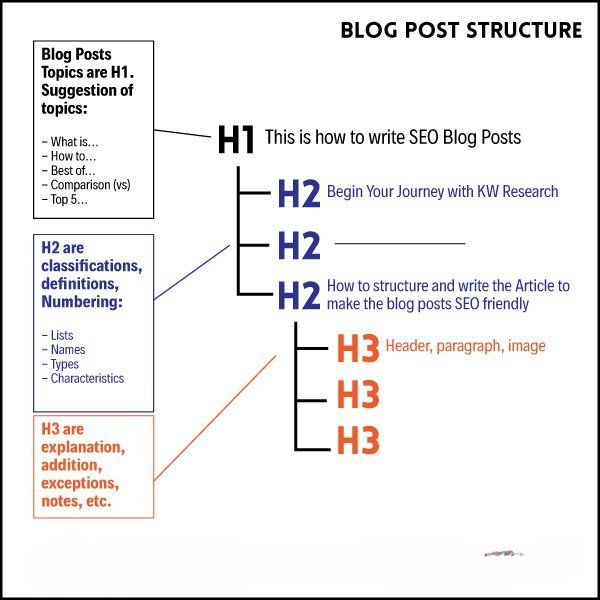
Content structure refers to how you organise your blog using headings (H1, H2, H3) to improve readability and rankings.
Search engines use structure to understand your content. I have explained this topic in greater detail and with more clarity in the Proven SEO Blog Structure below.
Proper structure:
- H1 → Main title (only once)
- H2 → Main sections
- H3 → Subsections
Example:
- H1: SEO Friendly Blog Post
- H2: What is an SEO blog
- H3: Definition
- H3: Example
According to SEO best practices, structured content improves crawlability and ranking potential – Google Developers 2025
Why structure matters:
- Helps Google understand your topic
- Improves user experience
- Increases chances of featured snippets
When I improved my blog structure, my rankings increased within a few weeks.
Key insight:
A messy blog confuses Google. A structured blog ranks.
Once you understand the basics, the next step is starting your blog the right way. This step-by-step guide on how to start a blog that makes money will help you avoid beginner mistakes.
Step 5: Write High-Quality Content (E-E-A-T Rule)
E-E-A-T stands for Experience, Expertise, Authoritativeness, and Trustworthiness.
This is Google’s way of checking if your content is reliable.
A good SEO introduction should:
- Talk about the reader’s problem
- Use simple language
- Explain what they will learn
- Build trust
How to apply E-E-A-T:
- Add real examples
- Use statistics
- Explain concepts clearly
- Show practical steps
Example:
Weak: SEO is important
Strong: SEO drives over 1000% more traffic than social media for many websites
Why this matters:
Google prefers helpful, experience-based content, not generic AI text.
Key insight:
Content that teaches clearly always beats content that sounds smart.
Step 6: Optimize On-Page SEO (Visibility Booster)
On-page SEO is the process of optimizing elements inside your blog to improve search rankings.
Key elements:
- Title tag (keyword included)
- Meta description (click-focused)
- URL (short + keyword)
- Image alt text
Example:
Bad URL: yoursite.com/post123
Good URL: yoursite.com/Seo-friendly-blog-post
Why it matters:
On-page SEO helps search engines understand and rank your content properly.
- Improves visibility
- Increases CTR
- Helps indexing
Key insight:
Without on-page SEO, even great content struggles to rank.
Read: How to Use AI for On-Page SEO (Ultimate Step-by-Step Guide to Rank Faster in 2026)
Step 7: Internal Linking + Readability (Ranking Multiplier)
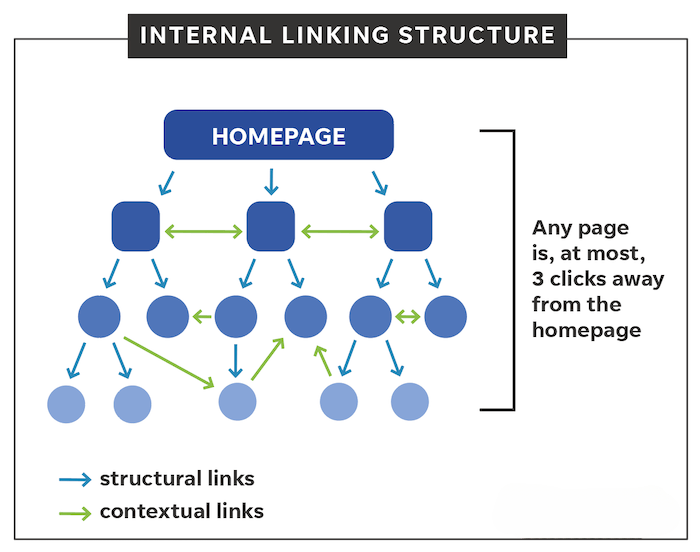
Internal linking connects your blog to other pages on your website.
This improves SEO and user experience.
Why it works:
- Passes SEO authority
- Keeps users on your site longer
- Helps Google crawl your site
Example:
Inside your blog:
From the Day 11 post, you can link to:
- Day 1: What Is Blogging
- Day 4: How to Start a Blog
- Day 8: Freelancing vs Blogging
Link to related topics like “how to write blog posts faster using AI” → AI guide]
Readability matters too:
- Use short paragraphs
- Use bullet points
- Avoid complex words
Example:
Bad:
- This article aims to comprehensively demonstrate the multifaceted approach…
Good:
- This guide shows you how to rank your blog step by step.
Why this matters:
- Passes SEO value
- Helps Google crawl
- Keeps users engaged
Key insight:
If users don’t read your content, Google won’t rank it.
Let’s be honest:
- Most bloggers skip keyword research
- Ignore search intent
- Write without structure
That’s why 90% of content gets zero traffic.
If you follow this system properly, you’re already ahead of most bloggers.
What Is the Best Structure for an SEO Optimized Blog Post?
The best structure for an SEO optimized blog post is a clear, hierarchical format designed to satisfy search intent, improve readability, and help search engines understand your content.
First, understand this:
Structure is not design – it’s ranking logic.
If your structure is weak, even great content won’t rank.
According to SEO best practices, clear headings, organized sections, and logical flow help both users and search engines understand content better – Source: Absolute Websites, 2026
Also, modern SEO emphasizes that blog posts must be structured for both humans AND AI systems like ChatGPT and Google AI Overviews.
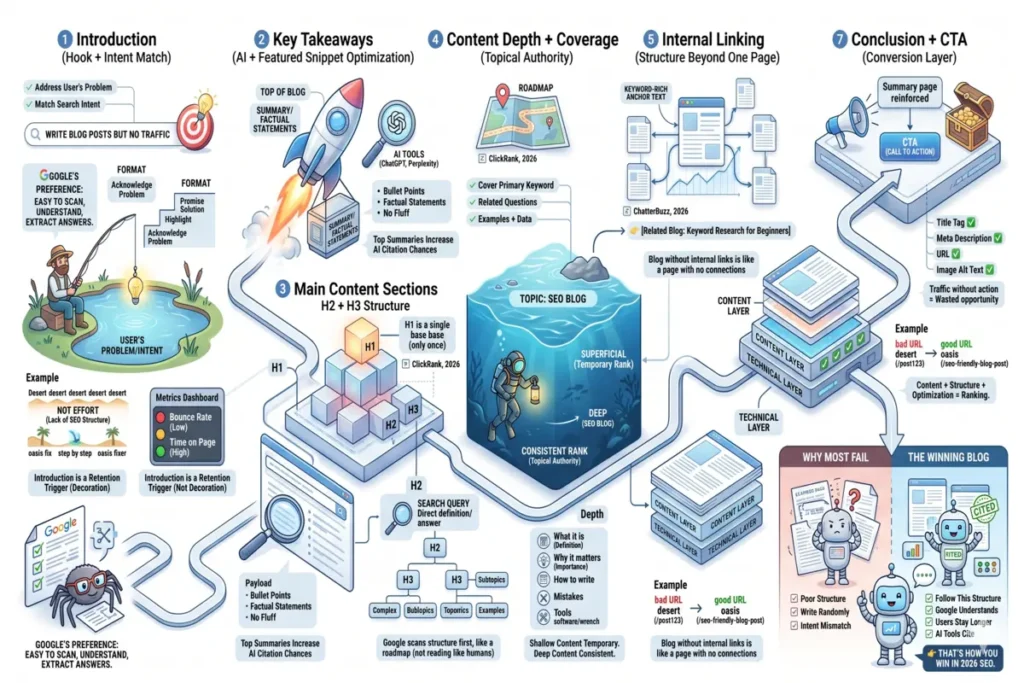
Proven SEO Blog Structure (Step-by-Step Breakdown)
A high-ranking blog follows a predictable structure because Google prefers content that is easy to scan, understand, and extract answers from.
Let’s break it down properly 👇
1. Introduction (Hook + Intent Match)
The introduction is the first section that decides whether users stay or leave.
First, it must immediately address the user’s problem.
Second, it must match search intent.
Ideal format:
- Acknowledge problem
- Highlight gap
- Promise solution
Example:
You’re writing blog posts but not getting traffic. The issue isn’t effort – it’s lack of SEO structure. In this guide, you’ll learn how to fix it step by step.
Why this matters:
Google tracks:
- Bounce rate
- Time on page
If users leave quickly, your rankings drop.
Key insight:
Your introduction is not decoration – it’s a retention trigger.
2. Key Takeaways (AI + Featured Snippet Optimization)
Key takeaways are a summary section placed at the top of your blog to improve readability and AI extraction.
According to modern SEO trends, summaries placed at the top help AI tools understand and cite your content faster
What to include:
- 5–7 bullet points
- Clear, factual statements
- No fluff
Example:
- SEO blogs are optimized for users and search engines
- Keywords guide content direction
- Structure improves readability
Why this matters:
- Helps in featured snippets
- Helps in AI citations (ChatGPT, Perplexity)
Key insight:
Top summaries increase your chances of being quoted by AI engines.
3. Main Content Sections (H2 + H3 Structure)
Main content is the core of your blog where you answer the topic in depth using structured headings.
Headings must follow a strict hierarchy:
- H1 → Title (only once)
- H2 → Main questions
- H3 → Subtopics
According to SEO formatting rules, headings act as a roadmap for search engines — Source: ClickRank, 2026
How to structure H2 sections:
Each H2 should:
- Be a search query
- Start with a direct answer
- Fully explain the topic
Example:
H2: What is SEO blog writing?
→ First sentence = definition
How to structure H3 sections:
Use H3 to:
- Break complex topics
- Add examples
- Improve readability
Example:
H2: How to write SEO blog
→ H3: Keyword research
→ H3: Content structure
Why this matters:
- Improves crawlability
- Improves user experience
- Increases snippet chances
Key insight:
Google doesn’t “read” like humans – it scans structure first.
4. Content Depth + Coverage (Topical Authority)
Content depth means covering a topic completely, not just superficially.
Google prefers content that answers all related questions.
According to SEO research, content should answer multiple related queries in one post – Source: Bynder, 2026
How to do it:
- Cover primary keyword
- Cover related questions
- Add examples + data
Example:
Topic:
SEO blog Include:
- What is it
- Why it matters
- How to write
- Mistakes
- Tools
Why this matters:
- Builds topical authority
- Reduces bounce rate
- Improves rankings
Key insight:
Shallow content ranks temporarily. Deep content ranks consistently.
5. Internal Linking (Structure Beyond One Page)
Internal linking connects your blog to other relevant pages on your website.
Structure is not just inside the blog – it’s across your entire site.
According to SEO strategy, content clusters and internal links improve authority and rankings – Source: ChatterBuzz, 2026
How to use it:
- Link to related blogs
- Use keyword-rich anchor text
- Add links naturally
Example:
AI Blogging for beginners in 2026: How AI Helps Bloggers Write Faster and Grow Traffic
You can find more details about it in the internal linking section above.
6. On-Page SEO Elements (Technical Structure Layer)
On-page SEO elements are technical components that support your content structure.
These include:
- Title tag
- Meta description
- URL
- Image alt text
According to SEO guidelines, these elements help search engines understand and rank your page
You can find more details about it in the On-page SEO section above.
Step 7: Add Images with Meaning
Images are not decoration only.
They help:
- Break content
- Improve user experience
- Reduce bounce rate
Best practice:
- 1 image every 400–500 words
(Recommended Size – 1200*800 for Blog post image)
- Relevant image
- Clean and clear
Every image should have an ALT name; it’s mandatory for ranking.
8. Conclusion + CTA (Conversion Layer)
The conclusion is where you convert readers into action.
Most bloggers ignore this – big mistake.
What to include:
- Summary
- Reinforcement
- CTA (call to action)
Example:
Now you know how to structure SEO blogs. Apply this system to your next post and start ranking.
Why this matters:
- Increases engagement
- Builds trust
- Drives conversions
Key insight:
Traffic without action = wasted opportunity.
Final Reality
Let’s be real:
- Most blogs fail because of poor structure
- They write randomly without a system
- They don’t match search intent
That’s why they don’t rank.
If you follow this structure:
- Google understands your content
- Users stay longer
- AI tools cite your blog
That’s how you win in 2026 SEO.
How Do Keywords Work in Blog SEO?
Keywords work in blog SEO by signaling search engines what your content is about.
First, place keywords in:
- Title – tells Google your main topic and improves ranking relevance.
- First 100 words – helps search engines quickly understand your content context.
- Headings – organise content and reinforce keyword relevance for better SEO structure.
- Meta description – improves click-through rate by matching user search intent.
- Avoid keyword stuffing – Overusing keywords can harm rankings because modern search engines focus on context and quality. (Use only 1% to 1.5%)
Key insight:
Keyword research involves identifying search terms your audience uses and integrating them naturally into content.
How to Optimize Blog Posts for Featured Snippets?
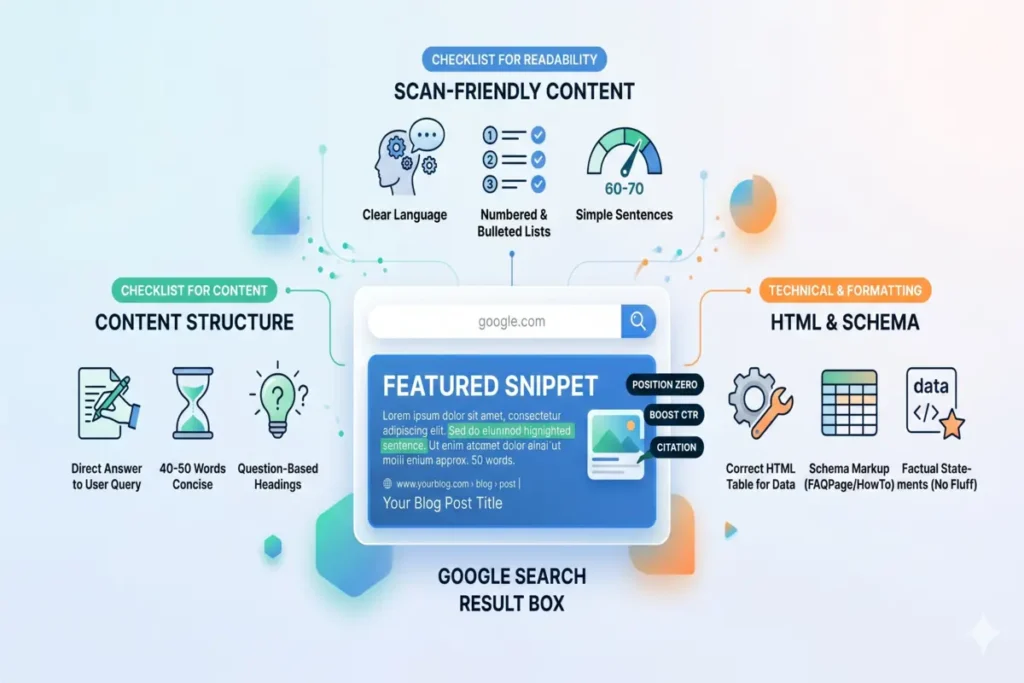
Featured snippet optimization involves structuring content so Google can easily extract it as a direct answer.
Follow these steps:
- Use question-based headings – helps Google identify your content as a direct answer to user queries.
- Give a direct answer in 40–60 words – concise answers are more likely to be selected as snippets.
- Use bullet points or numbered lists – improves chances of getting list-style snippets.
- Target long-tail keywords – snippet results чаще appear for specific, question-based searches.
- Keep content simple and structured – clear formatting helps Google scan and extract information easily.
Focus on clarity – Google selects content that answers queries quickly and accurately.
Key insight:
Featured snippets reward content that is clear, structured, and directly answers the user’s question.
What Are Common SEO Writing Mistakes to Avoid?
SEO writing mistakes are errors that reduce your chances of ranking on Google and driving traffic.
- Keyword stuffing – overusing keywords makes content unnatural and harms rankings.
- Ignoring search intent – writing content that doesn’t match what users want prevents ranking.
- Low-quality or thin content – shallow or generic content fails to provide value and struggles to rank.
- Poor content structure – messy formatting and missing headings reduce readability and SEO performance.
- Writing for Google, not users – content focused only on algorithms fails to engage real readers.
- Wrong keyword targeting – choosing highly competitive or irrelevant keywords limits visibility.
- Weak internal linking – not connecting related content reduces SEO authority and crawlability.
Key insight:
SEO fails not because of a lack of effort, but because of wrong execution and outdated practices.
Read: Common Blogging Mistakes Beginners Make (And How to Avoid Them in 2026)
What Tools Help in Writing SEO Friendly Content?
SEO tools help you research keywords, optimize content, and improve rankings faster by using data instead of guesswork.
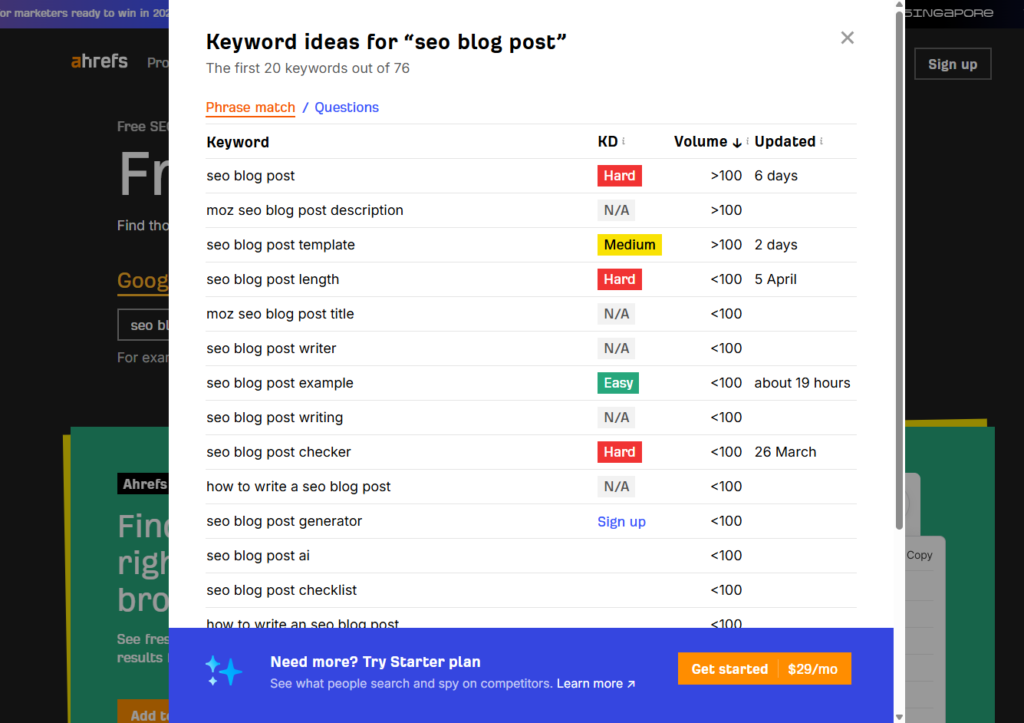
- Keyword research tools – find what people are searching so you write content with real demand (e.g., Google Keyword Planner, Ahrefs)
- SEO writing tools – guide you with real-time suggestions to optimize headings, keywords, and structure (e.g., Surfer, Clearscope)
- AI writing tools – help you write faster, generate ideas, and improve content efficiency (e.g., ChatGPT, Jasper)
- SEO plugins – optimize on-page SEO like meta tags, readability, and technical elements (e.g., Yoast SEO, RankMath)
- Analytics tools – track performance and show what’s working so you can improve rankings (e.g., Google Analytics, Search Console)
Key insight:
Tools don’t rank your blog – they help you make better SEO decisions faster.
Read: 10 Best Free AI Tools for Blogging (Beginner Guide + Pros & Cons Explained)
What Should You Do Next to Rank Your Blog?
To rank your blog, you need to consistently apply SEO fundamentals like keyword targeting, content optimization, and regular updates.
First, understand this:
Publishing alone doesn’t rank – optimization + consistency does.
According to SEO best practices, ranking requires a mix of strategy, quality content, and ongoing improvements – Source: Google SEO Starter Guide, 2026
Action Plan:
- Pick one focused keyword – targeting a clear keyword helps your blog rank faster instead of competing broadly.
- Create a proper outline before writing – structured content improves readability and SEO performance.
- Write valuable, intent-matching content – content must fully solve the user’s problem to rank well.
- Publish consistently (weekly or bi-weekly) – regular content builds authority and long-term traffic.
- Update and optimize old posts – refreshing content improves rankings and keeps it relevant.
Key insight:
Ranking is not a one-time task – it’s a repeatable system of creating, optimizing, and improving content over time.
Many beginners also compare blogging with freelancing before deciding their path. If you are confused, this detailed comparison of freelancing vs blogging will help you choose wisely.
FAQs
Q1. What is an SEO friendly blog post?
An SEO friendly blog post is content optimized with keywords, structure, and user intent to rank higher on search engines and drive organic traffic.
Q2. How long should an SEO blog post be?
An SEO blog post should be at least 1500–2500 words to rank effectively, but quality and depth matter more than word count.
Q3. How long does it take for a blog to rank on Google?
A blog typically takes 1–3 months to start ranking, but competitive keywords can take longer depending on SEO strength.
Q4. Do keywords still matter in SEO?
Yes, keywords still matter, but modern SEO focuses more on search intent, context, and content quality rather than keyword repetition.
Q5. Can beginners rank blog posts on Google?
Yes, beginners can rank blog posts by following proper SEO strategies like keyword research, content optimization, and consistent publishing.
Conclusion
An SEO friendly blog post is not just about writing content – it’s about creating content that ranks, attracts traffic, and converts consistently.
Understand this clearly:
Ranking on Google in 2026 depends on relevance, structure, and user-focused content – not shortcuts or tricks.
If you apply what you learned – keyword research, proper structure, and on-page SEO – your blog will not only rank but also get picked up by AI tools like ChatGPT and Google AI Overviews.
So now it’s your turn.
- Pick ONE keyword
- Write ONE SEO friendly blog post
- Apply this exact system
And you’ll already be ahead of most people.
Now I want to hear from you:
Are you struggling more with traffic, ranking, or writing SEO content?
Drop your answer in the comments – I’ll personally help you fix it…
Written by Pratap Keshari Panda
Digital Marketing Strategist & SEO Specialist helping beginners grow traffic and income with AI-powered blogging
Reviewed by Rahul Verma
SEO Analyst with 5+ years of experience in On-Page SEO and Content Optimization

 350+ Blog Guides Published


14 Comments
[…] A proper outline makes it easier to follow proven methods from how to write SEO blog posts. […]
[…] Want to learn SEO – How to Write SEO Friendly Blog Posts (Easy & Practical Guide for Beginners) […]
[…] can read this article How to Write SEO Friendly Blog Posts. that helps you to know about basic […]
[…] If you want better results, learn how to write SEO friendly blog posts. […]
[…] is very easy to understand how to write SEO friendly blog posts by clicking here; it will help you combine AI tools with effective SEO […]
[…] Writing SEO-friendly blog posts helps search engines understand and rank your content more effective… […]
[…] Click Here – How to Write SEO Friendly Blog Posts (Easy & Practical Guide for Beginners) […]
[…] SEO-friendly blog posts ensures your content structure supports long-term ranking […]
[…] SEO-friendly blog posts ensures your content is structured correctly for search engines and […]
[…] competition keywords perform best when your content is written in an SEO-friendly way that matches search intent and […]
[…] ChatGPT works best when combined with SEO-friendly content writing, because search engines still prioritise structure, clarity, and user […]
[…] get better results from Pinterest, your blog content must be SEO-friendly, because clear structure and intent help pins perform better in search […]
[…] “Promotion works best when your content is SEO-ready – this guide on writing SEO-friendly blog posts explains how to do it properly.” […]
[…] with Fiverr, some people also earn through free platforms, so check how to create a free blog and make money step by […]