

Table of Contents
ToggleMany beginners think an SEO friendly blog post means stuffing keywords everywhere or writing like a robot.
That is the biggest mistake.
Let me tell you the truth in very simple words:
👉 An SEO friendly blog post is written for humans first, Google second.
Google wants one thing –
the best answer written clearly for real people.
In this guide, I will explain how to write SEO friendly blog posts step by step, in easy English, with real examples.
No technical headache.
No confusion.
By the end, you will know exactly how to write blog posts that:
- Google understands
- Readers enjoy
- Rank slowly but strongly
- Work long-term
Let’s start from the basics.
If you are confused about niche + content direction, this workbook helps a lot. 👉 Download My Free Niche Selection Workbook
What Is an SEO Friendly Blog Post?

An SEO friendly blog post is an article that is:
- Easy to read
- Well-structured
- Helpful
- Clear
- Answer-focused
- Naturally optimised
It is NOT about tricks.
It is NOT about keyword stuffing.
Simple example:
If someone searches
“How to write SEO friendly blog post”
Google wants an article that explains:
- What it is
- Why it matters
- How to do it
- Common mistakes
- Clear steps
If your post does this clearly, → Google trusts you.
That’s SEO.
If you are still confused about what blogging actually is and how it works, I strongly recommend reading this beginner guide on what blogging is and how it makes money. It will clear your basics completely.
Step 1: Start With the Right Keyword (Very Important)
Every SEO friendly blog post starts with ONE main keyword.
Use one focus Keyword and one Secondary Keyword and use it naturally in your blog post for better ranking.
Example keywords:
- seo friendly blog post
- how to write seo friendly blog post
What beginners do wrong
They choose 5–6 keywords and try to target all of them.
That confuses Google.
What you should do
- Pick one main keyword
- Use it naturally
- Build the whole article around it
Your post will rank on Google.
Step 2: Write a Clear, Human Introduction
Your introduction decides everything. Place it below your H1 and make it clear and useful.
If the intro is boring → user leaves → ranking drops.
A good SEO introduction should:
- Talk about the reader’s problem
- Use simple language
- Explain what they will learn
- Build trust
Example (simple):
“Many beginners think SEO writing is difficult. But actually, writing an SEO friendly blog post is about writing clearly for humans while helping Google understand your content.”
That’s it.
No fancy words.
Step 3: Use Proper Headings like (H1, H2, H3)
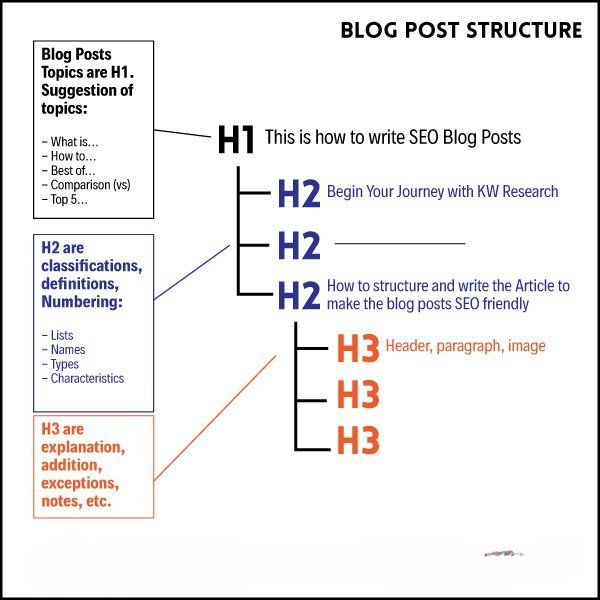
Google reads headings to understand your content. Your entire post should have only one H1, followed by H2, H3.
So, write properly, for example:
- H1: How to Write SEO Friendly Blog Posts
- H2: What Is an SEO Friendly Blog Post
- H2: Step-by-Step Guide
- H3: Keyword Placement
- H3: Content Structure
This makes your post: Easy to scan Easy to read Easy for Google
Never skip headings. Also, place your keywords in headings for the best SEO optimization.
Once you understand the basics, the next step is starting your blog the right way. This step-by-step guide on how to start a blog that makes money will help you avoid beginner mistakes.
Step 4: Write Simple Paragraphs (This Is Key)
Google loves clarity.
Follow this rule:
- 2–4 lines per paragraph
- One idea per paragraph
- Simple sentences
Bad example:
Long paragraph, many ideas, confusing words.
Good example:
Short paragraph.
Clear point.
Easy words.
This also improves:
✔ readability
✔ time on page
✔ SEO score
Step 5: Use the Keyword Naturally (Not Forcefully)
This is where most people fail.
Wrong way:
“SEO friendly blog post is important because SEO friendly blog post helps SEO friendly blog post rank better…”
This is keyword stuffing.
Right way:
Use the keyword where it fits naturally:
- Title
- First paragraph
- One or two H2s
- A few times in content
That’s enough.
Step 6: Add Internal Links (Very Powerful SEO Signal)
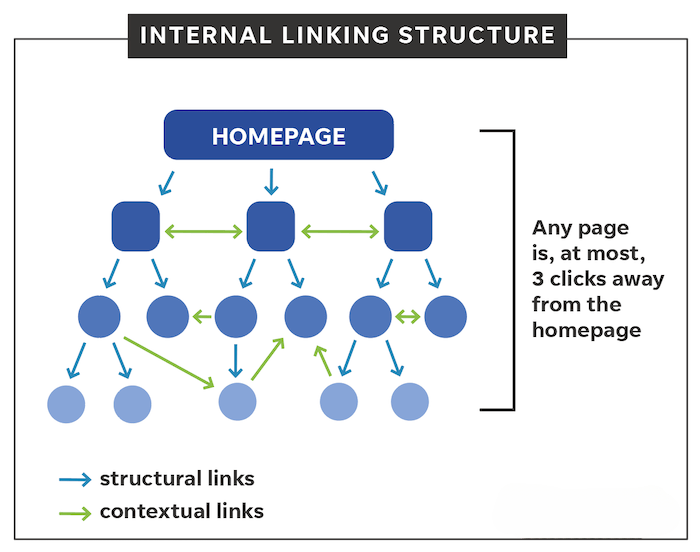
Internal linking means linking to your own blog posts.
Example:
From this post, you can link to:
- Day 1: What Is Blogging
- Day 4: How to Start a Blog
- Day 8: Freelancing vs Blogging
Why this matters:
- Google understands site structure
- Readers stay longer
- Authority passes between pages
Internal links = silent SEO booster.
Step 7: Add Images with Meaning
Images are not decoration only.
They help:
- Break content
- Improve user experience
- Reduce bounce rate
Best practice:
- 1 image every 400–500 words
- Relevant image
- Clean and clear
Every image should have an ALT name; it’s mandatory for ranking.
Step 8: Write for Humans, Not Algorithms
This is the most important step.
Before publishing, ask yourself:
- Does this help a beginner?
- Is this easy to understand?
- Would I read this fully?
If the answer is YES →
Google will eventually rank it.
SEO is a long game, not instant magic.
Common Mistakes Beginners Make
Avoid these mistakes:
- Keyword stuffing
- Writing short, thin content
- No internal links
- No structure
- Copying others
- Writing only for SEO tools
SEO tools guide you —
they don’t control Google.
Many beginners also compare blogging with freelancing before deciding their path. If you are confused, this detailed comparison of freelancing vs blogging will help you choose wisely.
Final Thoughts - SEO Is Simple If You Respect Readers
Writing an SEO friendly blog post is not difficult.
You just need:
- Clear thinking
- Simple language
- Helpful intent
- Proper structure
- Patience
If you follow this process daily,
Your blog will grow slowly but strongly.
That alone puts you ahead of most beginners.
If you want to choose the right niche and content direction:
👉 Download My Free Niche Selection Workbook
FAQs
❓ What is an SEO friendly blog post?
A blog post written for humans but structured so Google can understand it easily.
❓ How long should an SEO blog post be?
800–2000 words depending on topic. Quality matters more than length.
❓ Do I need tools to write SEO content?
Tools help, but clear thinking and structure matter more.
❓ How long does SEO take to work?
Usually 2–6 months. SEO is slow but powerful.
❓ Can beginners write SEO friendly posts?
Yes. With simple rules, anyone can write.
So, writing an SEO-friendly blog post is not about tricks or stuffing keywords. Instead, it’s about helping real people with clear structure, simple language, and useful information. When you focus on readers first and search engines second, rankings come naturally. Now, consistency is the real game-changer – keep practicing, keep improving.
💬 Now tell me:
Which part of SEO blog writing do you find the most difficult – keywords, headings, or content flow?
Comment below, I personally read and reply.



6 Comments
[…] SEO-friendly blog posts ensures your content is structured correctly for search engines and […]
[…] competition keywords perform best when your content is written in an SEO-friendly way that matches search intent and […]
[…] ChatGPT works best when combined with SEO-friendly content writing, because search engines still prioritise structure, clarity, and user […]
[…] get better results from Pinterest, your blog content must be SEO-friendly, because clear structure and intent help pins perform better in search […]
[…] “Promotion works best when your content is SEO-ready – this guide on writing SEO-friendly blog posts explains how to do it properly.” […]
[…] with Fiverr, some people also earn through free platforms, so check how to create a free blog and make money step by […]